
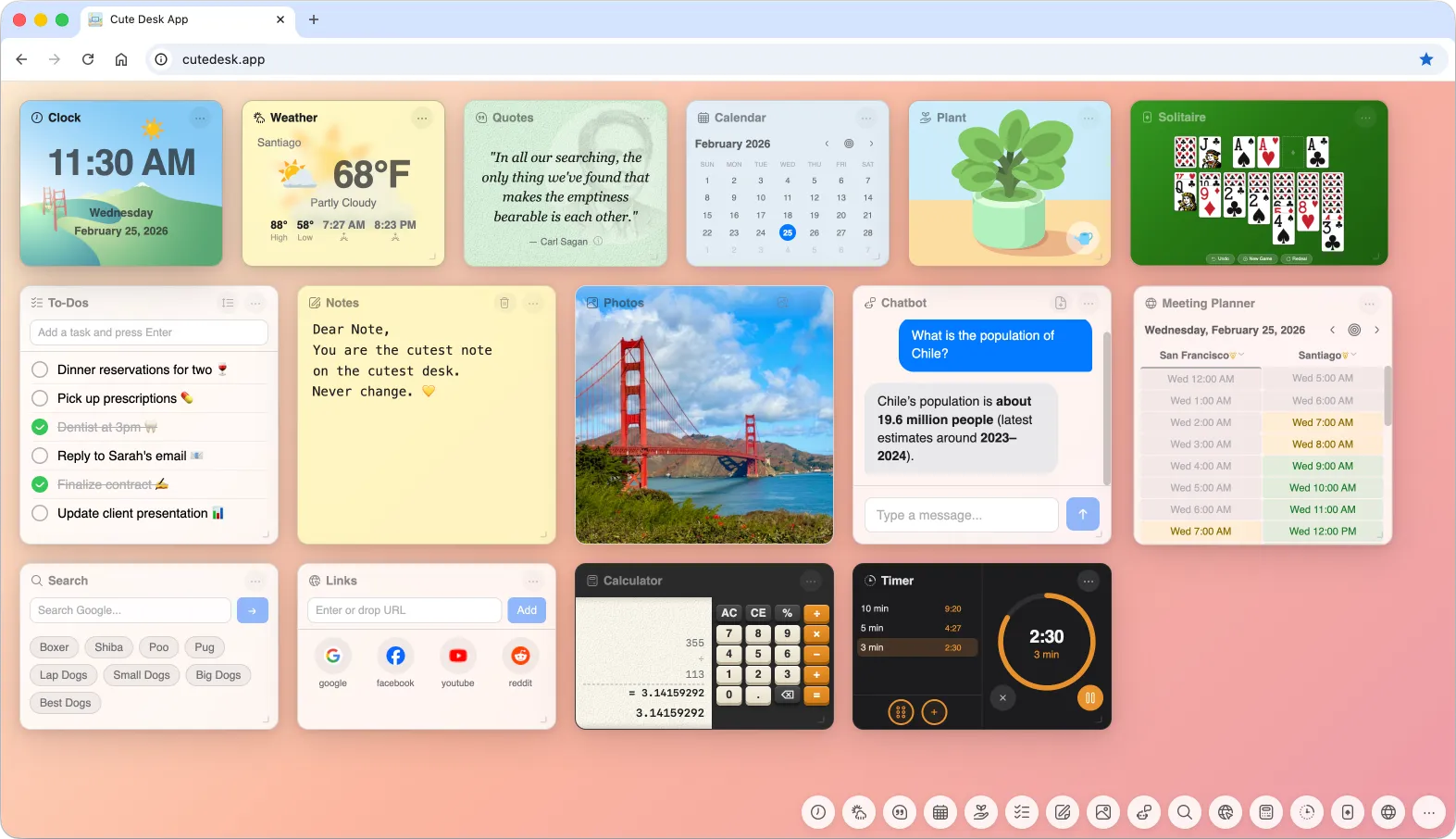
It Started with a Simple Need
Every time I opened a new tab in my browser, I wanted to see the things that mattered to me right away: the time, the weather, a calendar, and whatever information was important to me that day. That's it. No news feeds I didn't ask for, no trending topics, no algorithmic suggestions. Just my stuff, ready the moment the page loaded.
I searched everywhere. I tried new tab extensions, dashboard apps, bookmark managers. Nothing quite fit. Some were too minimal — a clock and a background photo, nothing else. Others were bloated with features I didn't need and locked the useful ones behind a subscription. Most of them stored my data on someone else's server, which didn't sit well with me either.
So I decided to build my own.
A Humble Beginning
The first version was about as simple as it gets. I created a small HTML page with three widgets: a clock, the weather, and a calendar. My plan was to keep it local — just a file on my drive that I'd point my browser to. By being local, it will be lightning fast. No server, no hosting, no deployment meant all the data would be private. A private little start page for myself.
The clock showed the time. The weather pulled a forecast. The calendar showed today's date. That was enough. For about a week.
Then I Got Obsessed
Here's the thing about me: I love creating digital products. I love building things that people enjoy using, things that feel polished and thoughtful. Once I had that basic start page working, I couldn't stop thinking about what else it could do. What if I added notes? What about a to-do list? Could I get inspirational quotes to show up each day?
What started as a quick weekend project turned into something I was working on every evening. I'd finish dinner, sit down, and think, "I'll just add one more widget." That one widget would lead to two more ideas, and before I knew it, hours had passed. I was completely absorbed.
The project grew from something very simple into something I'm genuinely proud of.
But the original principles needed to stay:
- Start Page — Visible on your browser start page, tabs, and windows
- Completely Private — All your data is stored locally in your browser
- No Account Needed — Works instantly, just open and go
- Fast — Lightning fast and dependency-free page
- Free — Useful and cute productivity desktop widgets in your browser
One Widget at a Time
I started adding widgets based on what I personally needed throughout my day. Inspirational quotes from people I admire — scientists, writers, leaders — because starting the day with a good thought makes a difference. A to-do list, because I was tired of opening a separate app just to check what I needed to do next. Notes, because sometimes you just need to jot something down fast.
Then came the photos widget. I wanted to see pictures of my family and beautiful photos I'd taken right there on my start page. Not buried in a cloud album somewhere — right in front of me, every time I opened a tab.
I added a calculator, but not just any calculator. I built it to look and work like an old-fashioned 1970s paper-tape calculator, the kind with a roll of paper that shows every operation. I can scroll through the tape, see every transaction I've made, and copy the whole thing to paste into an email. It's one of my favorite details.
A search box came next, so I could run a Google search straight from the start page without navigating anywhere. I noticed that most of the time when I open a new tab, the first thing I do is search for something — so I made sure the cursor lands in the search box automatically. Open a tab, start typing, hit enter. It also keeps track of my recent searches, so I can go back to something I looked up earlier without trying to remember what I typed.
I added a links widget for the sites I visit constantly. Instead of hunting through bookmarks, they're right there. I can even drag a link from another browser tab and drop it directly into the widget to save it.
Solving Real Problems
Some widgets came from very specific problems I was dealing with. The meeting planner is a perfect example. I regularly schedule meetings with people across different time zones, and I was constantly switching between time zone converter websites trying to find a slot that worked for everyone. So I built a widget where I can add two or three cities, see their working hours side by side, and immediately spot the overlap. When I find a good time, I copy the schedule and paste it straight into an email to share with everyone.
The timer widget was another practical addition. I needed multiple timers running at the same time — one for a task I was tracking, another for something in the kitchen. Now I can set up to ten timers simultaneously, each counting down independently.
The Fun Stuff
Not everything had to be about productivity. I added a solitaire game because sometimes you just need a two-minute break. I added a chatbot that connects to your own OpenAI Platform API key, so you can have a quick AI conversation without leaving your start page.
And then there's the plant. This might be the widget that makes people smile the most. It's a cute little virtual plant that lives on your start page. You water it, and every day it grows a little bit. If you forget to water it, well — it might not make it. There's something oddly satisfying about checking in on your tiny plant each morning.
Making It Truly Personal
What I'm most proud of is how customizable the whole thing became. Every widget can be dragged around the start page and placed wherever it makes sense to you. You arrange the layout based on what's important to you — maybe the clock and weather go up top, the to-do list sits in the center, and the photos live in the corner where you'll glance at them throughout the day.
The to-do list alone has more depth than I originally planned. You can add items, reorder them by dragging, cross them out when they're done, and edit them inline — just click the text and start typing. The photos widget supports drag-and-drop too: you can pull images from the web or from your local files and drop them right in. The links widget works the same way.
Every widget has its own set of features tucked into a small options menu. The notes widget lets you pick from three font sizes. The weather widget lets you switch between Fahrenheit and Celsius. The calculator lets you copy the paper tape as formatted HTML to share. These small touches add up to something that feels genuinely useful every single day.
From Local File to Real Product
I never planned to share this with anyone. It was supposed to be a file on my drive. But the more I built, the more I realized other people might want the same thing — a start page that's actually theirs, that doesn't require an account, that doesn't send data to a server, and that just works the moment you open your browser.
So I turned it into Cute Desk App. Everything still runs entirely in the browser. All your data stays local on your machine. Nothing is sent to a server. There's no sign-up, no subscription, and no tracking. It's the same tool I built for myself, now available to anyone who wants it.
If you've ever opened a new tab and thought, "I wish this page actually did something useful," give it a try. It started because I had that exact thought — and I couldn't find anything that solved it the way I wanted.
If you enjoy using Cute Desk App, please help me keep improving it by leaving a tip. It means a lot and goes directly toward making the app even better.

Aldo is a product leader with 10+ years of experience helping Fortune 500 companies, small businesses, and startups build and grow web, mobile, eCommerce, and AI-integrated digital products. He is the founder of Copotential, a San Francisco-based product consultancy.
Ready to move your product forward? Start here →